
4 min. read
Security and compliance roundup
A summary of the recent achievements on the security and compliance front: SOC2 Type II, independent audits, Security Made in Europe label

Passbolt team
14 February, 2022

Jean-Christophe Vassort
28 February, 2022

The quickest and easiest way to setup passbolt with PostgreSQL is currently docker. The procedure is pretty straightforward. If you’d like to try postgreSQL with another setup than docker, you can jump directly to the next section.
Step 1: Download our docker-compose file:
curl -Ls https://raw.githubusercontent.com/passbolt/passbolt_docker/master/docker-compose/docker-compose-ce-postgresql.yaml -o docker-compose.yamlStep 2: Ensure the file has not been corrupted by verifying its shasum:
[ "$(sha256sum docker-compose.yaml | awk '{print $1}')" = "56b04379d6ccf3faff4b7a7d62b48929941513301b3552cc32aeea355e8a5504" ] && echo "Checksum OK" || (echo "Bad checksum. Aborting" && rm -f docker-compose.yaml)Step 3: Review environment variables in docker-compose.yaml file to customize your instance.
The APP_FULL_BASE_URL environment variable is set by default to https://passbolt.local, using a self-signed certificate.
Update this variable with the server name you plan to use. You will find on our Docker documentation links about how to set up your own SSL certificate.
For more information on which environment variables are available on Passbolt, please check the passbolt environment variable reference.
Step 4: Start your containers
docker-compose up -dStep 5: Create the first admin user
docker-compose exec passbolt su -m -c
"/usr/share/php/passbolt/bin/cake \
passbolt register_user \
-u <[email protected]> \
-f <yourname> \
-l <surname> \
-r admin" -s /bin/sh www-data
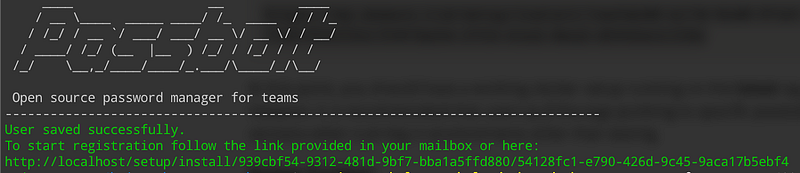
It will output a link similar to the below one that can be pasted on the browser to finalize the first user registration:
If you want to know more about passbolt docker setup, check out the official manual.
If docker setup looks too easy, or doesn’t apply to you, you can also go for a slightly more complex manual setup of passbolt with postgresql.
Step 1: Download the dependencies installation script
wget https://raw.githubusercontent.com/passbolt/passbolt-dep-scripts/main/passbolt-repo-setup.ce.shStep 2: Ensure that the script is valid and execute it:
[ "$(sha256sum passbolt-repo-setup.ce.sh | awk '{print $1}')" = "ce96ab921e2fa448d48da018e3be0e9646791629dffb13707bbc49b55c739490" ] && sudo bash ./passbolt-repo-setup.ce.sh || echo "Bad checksum. Aborting" && rm -f passbolt-repo-setup.ce.shStep 3: Install passbolt package in non-interactive mode to avoid mysql installation:
sudo DEBIAN_FRONTEND=noninteractive apt-get install --no-install-recommends passbolt-ce-serverStep 4: Install postgresql package and the PHP postgresql extension:
sudo apt install postgresql php-pgsqlStep 5: Create a passbolt postgresql database and user
$ sudo su - postgres
postgres:~$ psql
psql (13.5 (Debian 13.5–0+deb11u1))
Type "help" for help.
postgres=# create database passboltdb;
CREATE DATABASE
postgres=# create user passboltuser with encrypted password 'passboltpassword';
CREATE ROLE
postgres=# grant all privileges on database passboltdb to passboltuser;
GRANT
postgres=# quit
Step 6: Create passbolt server OpenPGP keys
Create a new OpenPGP key without passphrase:
sudo -H -u www-data bash -c "gpg --homedir /var/lib/passbolt/.gnupg --batch --no-tty --gen-key <<EOF
Key-Type: default
Key-Length: 4096
Subkey-Type: default
Subkey-Length: 4096
Name-Real: John Doe
Name-Email: [email protected]
Expire-Date: 0
%no-protection
%commit
EOF"
Create the public and private keys to the passbolt gpg config location:
$ sudo -H -u www-data bash -c "gpg --homedir /var/lib/passbolt/.gnupg --armor --export-secret-keys [email protected]" > /etc/passbolt/gpg/serverkey_private.asc
$ sudo -H -u www-data bash -c "gpg --homedir /var/lib/passbolt/.gnupg --armor --export [email protected]" > /etc/passbolt/gpg/serverkey.asc
Finally, get openPGP server keys fingerprint (mine is B594D78399DE0074E000F191FD9B23E52AA2C15D)
sudo -H -u www-data bash -c "gpg --homedir /var/lib/passbolt/.gnupg --show-keys /etc/passbolt/gpg/serverkey.asc"
pub rsa2048 2022–02–23 [SC]
B594D78399DE0074E000F191FD9B23E52AA2C15D
uid John Doe <[email protected]>
sub rsa2048 2022–02–23 [E]
Step 7: configure nginx server
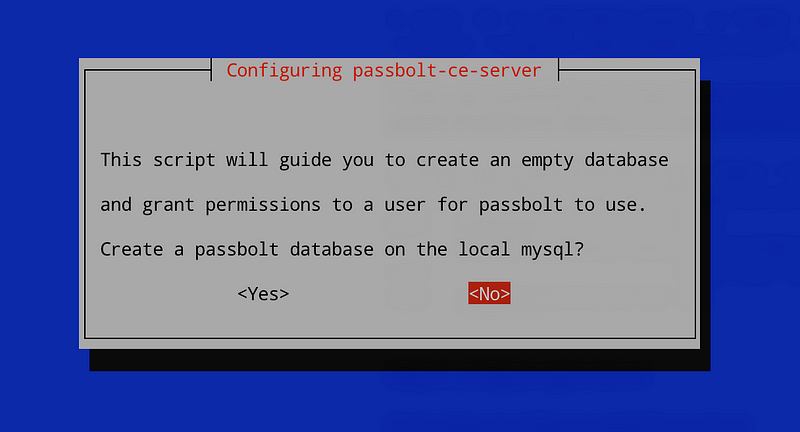
sudo dpkg-reconfigure passbolt-ce-serverAt the mysql step, answer no:
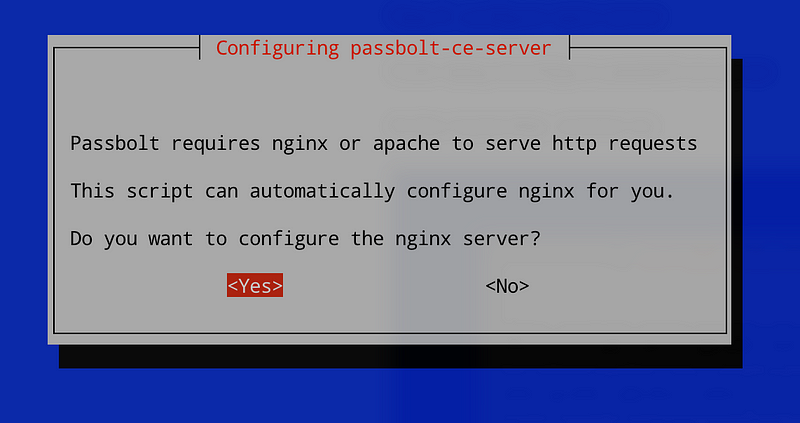
Answer yes to nginx:
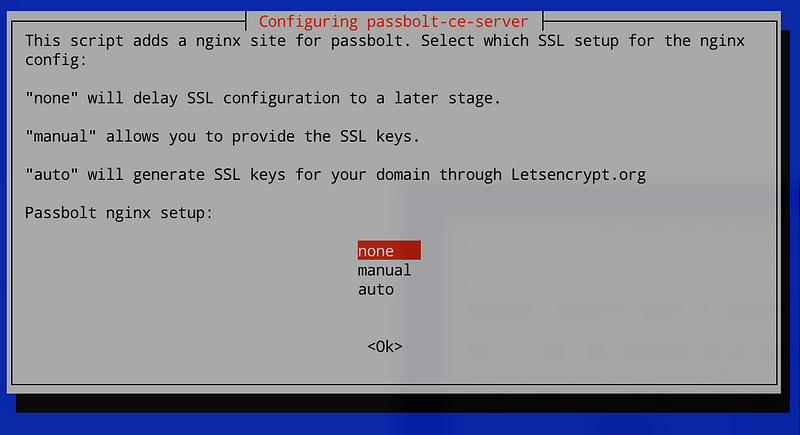
Select your SSL setup method:
Finally, enter your full domain name (without https://)
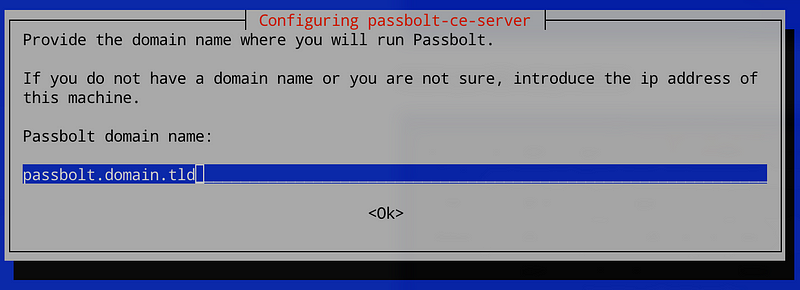
Remove the default nginx configuration file:
sudo rm /etc/nginx/sites-enabled/defaultAnd reload nginx:
sudo systemctl reload nginxstep 7: Create a passbolt.php configuration file:
Create passbolt configuration file from the default one:
sudo cp /etc/passbolt/passbolt.default.php /etc/passbolt/passbolt.phpEdit /etc/passbolt/passbolt.php and set :
<?php

return [
  'App' => [
    // A base URL to use for absolute links.
    // The fully qualified domain name (including protocol) to your application’s root
    // e.g. where the passbolt instance will be reachable to your end users.
    // This information is need to render images in emails for example.
    'fullBaseUrl' => 'https://passbolt.domain.tld',
  ],
  // Database configuration.
  'Datasources' => [
    'default' => [
      'driver' => \Cake\Database\Driver\Postgres::class,
      'host' => '127.0.0.1',
      'port' => '5432',
      'username' => 'passboltuser',
      'password' => 'passboltpassword',
      'database' => 'passboltdb',
    ],
  ],
  // Email configuration.
  'EmailTransport' => [
    'default' => [
      'host' => 'localhost',
      'port' => 25,
      'username' => 'user',
      'password' => 'secret',
      // Is this a secure connection? true if yes, null if no.
      'tls' => null,
      //'timeout' => 30,
      //'client' => null,
      //'url' => null,
    ],
  ],
  'Email' => [
    'default' => [
      // Defines the default name and email of the sender of the emails.
      'from' => ['passbolt@your_organization.com' => 'Passbolt'],
      //'charset' => 'utf-8',
      //'headerCharset' => 'utf-8',
    ],
  ],
  'passbolt' => [
    'gpg' => [
      'serverKey' => [
        // Server private key fingerprint.
        'fingerprint' => 'B594D78399DE0074E000F191FD9B23E52AA2C15D',
        'public' => CONFIG . 'gpg' . DS . 'serverkey.asc',
        'private' => CONFIG . 'gpg' . DS . 'serverkey_private.asc',
      ],
    ],
  ],
];
Set correct ownership for passbolt configuration file:
sudo chown root:www-data /etc/passbolt/passbolt.phpStep 8: Setup passbolt
You are almost good to go !!
Install passbolt:
sudo -H -u www-data bash -c "/usr/share/php/passbolt/bin/cake passbolt install --no-admin"And create the first admin:
sudo -H -u www-data bash -c "/usr/share/php/passbolt/bin/cake passbolt register_user -u [email protected] -f Admin -l Passbolt -r admin"This will generate the output below with a link to finish your registration:
____                  __          ____
    / __ \____  _____ ____/ /_  ____  / / /_
   / /_/ / __ `/ ___/ ___/ __ \/ __ \/ / __/
  / ____/ /_/ (__  |__  ) /_/ / /_/ / / /
 /_/    \__,_/____/____/_.___/\____/_/\__/
Open source password manager for teams
-------------------------------------------------------------------------------
User saved successfully.
To start registration follow the link provided in your mailbox or here:
https://passbolt.domain.tld/setup/install/d2d1680c-bec6-4138-b40d-c451a0294713/1ba2158a-d1e2-4a4d-94fc-9ef1757042b9
Step 9: Finish the installation through your browser:
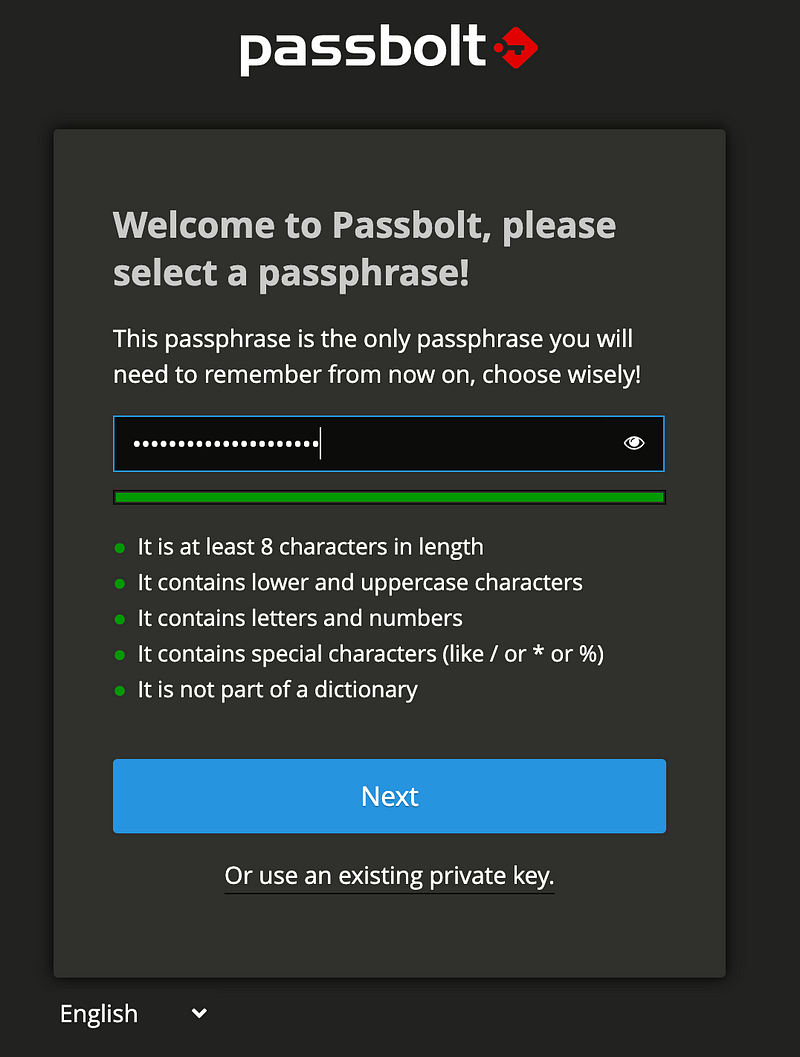
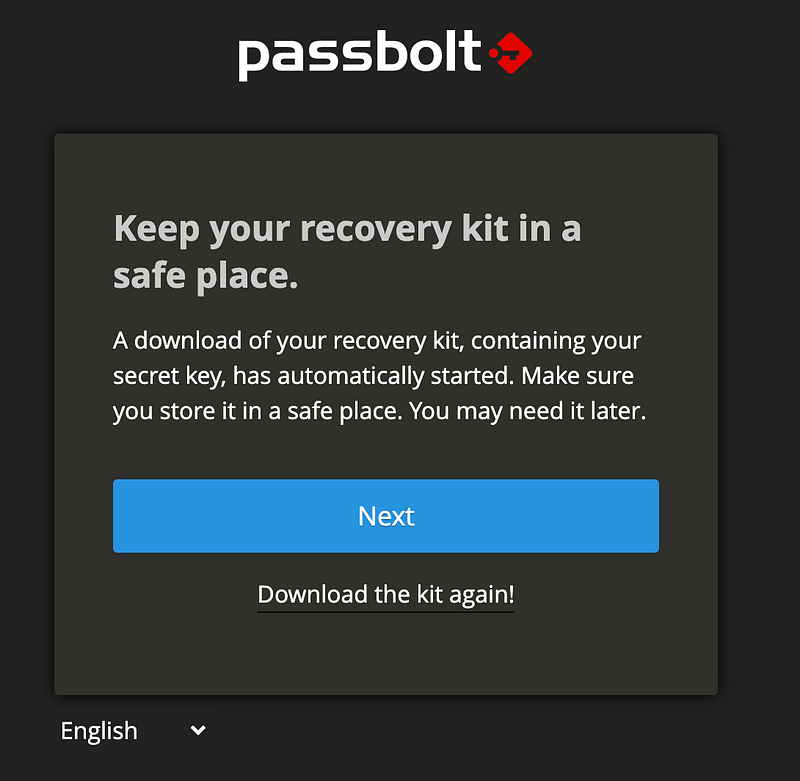
Keep your recovery kit, containing your secret key in a safe place. You may need it later.
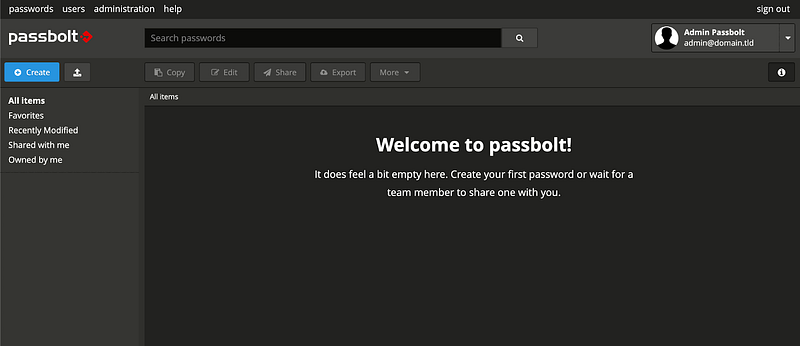
You did it !
If you are currently using passbolt with MySQL and want to migrate to PostgreSQL, follow the below procedure.
Step 1: Install additional packages
sudo apt install postgresql php-pgsql pgloaderA quick look about these additional packages:
Step 2: Create a passbolt postgresql database and user
$ sudo su - postgres
postgres:~$ psql
psql (13.5 (Debian 13.5–0+deb11u1))
Type "help" for help.
postgres=# create database passboltdb;
CREATE DATABASE
postgres=# create user passboltuser with encrypted password 'passboltpassword';
CREATE ROLE
postgres=# grant all privileges on database passboltdb to passboltuser;
GRANT
postgres=# quit
Step 3: Create a pgloader configuration file
Create a passbolt.load file with this content:
load database
from mysql://<user>:<password>@localhost/<dbname>
into postgresql://<user>:<password>@localhost/<dbname>
alter schema 'passbolt' rename to 'public';
Step 4: Migrate passbolt data from MySQL to PostgreSQL
Execute the pgloader command as postgres user:
sudo -H -u postgres pgloader passbolt.loadStep 5: Edit passbolt configuration file
As passbolt is currently configured to use MySQL, edit /etc/passbolt/passbolt.php and edit the Datasources section:
(…)
'Datasources' => [
  'default' => [
    'driver' => \Cake\Database\Driver\Postgres::class,
    'host' => 'localhost',
    'port' => '5432',
    'username' => 'passboltuser',
    'password' => 'passboltpassword',
    'database' => 'passboltdb',
  ],
],
(…)
Step 6: Ensure your data are correctly migrated
sudo -H -u www-data bash -c "/usr/share/php/passbolt/bin/cake passbolt migrate_postgres"
     ____                  __          ____
    / __ \____  _____ ____/ /_  ____  / / /_
   / /_/ / __ `/ ___/ ___/ __ \/ __ \/ / __/
  / ____/ /_/ (__  |__  ) /_/ / /_/ / / /
 /_/    \__,_/____/____/_.___/\____/_/\__/
Open source password manager for teams
-------------------------------------------------------------------------------
using migration paths
 - /etc/passbolt/Migrations
using seed paths
 - /etc/passbolt/Seeds
using environment default
using adapter pgsql
using database passboltdb
ordering by creation time
== 20211121231300 V340MigrateASCIIFieldsEncoding: migrating
== 20211121231300 V340MigrateASCIIFieldsEncoding: migrated 0.1839s
== 20211122732400 V350ConvertIdFieldsToUuidFields: migrating
== 20211122732400 V350ConvertIdFieldsToUuidFields: migrated 0.0142s
All Done. Took 0.2275s
Passbolt can now be used with Postgres.
That's all, you can go back to the passbolt web interface 🙂
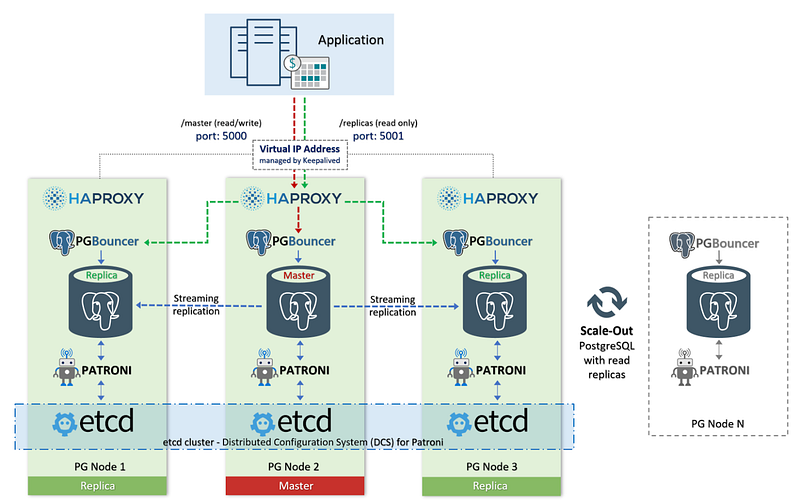
You now know how to plug passbolt to a PostgreSQL database. You can go further, for example by connecting passbolt to a PostgreSQL HA cluster with streaming replication driven by Patroni.
We have seen in this article how to use passbolt experimentally with a PostgreSQL database. The configuration method might appear a bit rocky, due to the experimental nature of the feature. However, worry not. The next steps for the Passbolt <> PostgreSQL support is to have a deeper integration supported out of the box by the various installation methods. Just a bit of patience, it’ll get there.
In the meantime, I hope that PostgreSQL lovers will find this article useful and give a spin to using passbolt with their favorite database.
4 min. read
A summary of the recent achievements on the security and compliance front: SOC2 Type II, independent audits, Security Made in Europe label
Passbolt team
14 February, 2022

7 min. read
Ansible is an open source IT automation engine sponsored by Red Hat to enable devops, developers and system administrators to automate the…
Jean-Christophe Vassort
7 April, 2022

 Made in Europe. Privacy by default.