How can I increase the auto logout time?
By default passbolt uses the PHP session duration setting to define when the auto logout should kick in. If the default session timeout is too short for you and your user you can extend it in the PHP configuration.
The browser extension pings the server every 15 minutes to keep the session alive, but it only does so while your passphrase is remembered. The check is not based on whether the browser is idle: it is based on whether the passphrase is still held in the extension's session storage, which is the case only if you ticked remember me when you logged in and the duration you chose has not yet elapsed.
This has a consequence worth knowing. If you did not tick remember me, the extension sends no keep-alive request at all, and the session times out on the PHP schedule even while you are actively using passbolt. A remembered passphrase, on the other hand, keeps the session alive while you are away from the machine.
A separate check runs every minute and logs you out locally as soon as the server reports that the session has gone.
If the browser window is closed (even if the browser application is not closed) you will get logged out right away.
The best way to keep your session active is via the remember me feature as shown here.
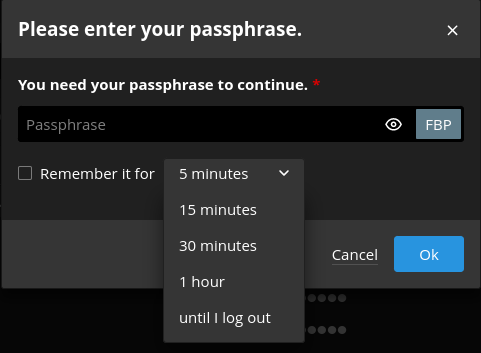
See the directive session.gc-maxlifetime
In order to change this number you must locate your php.ini file. Its location depends on your operating system and php versions.
For example on Debian or Ubuntu if you are using Nginx and PHP 8.2 it will be in /etc/php/8.2/fpm/php.ini but the easy way to find it is to execute this command:
$ grep -lr session.gc_maxlifetime /etc/ | grep fpm
/etc/php/8.2/fpm/php.ini
Once located replace the 1440 timeout value in seconds with for example 2700 for 45 minutes:
; After this number of seconds, stored data will be seen as 'garbage' and
; cleaned up by the garbage collection process.
; http://php.net/session.gc-maxlifetime
session.gc_maxlifetime = 2700
It's really important to note that the browser extension is sending a request to the server in order to keep the session active, that means that any behaviour that is interrupting it will end the session, even if the session lifetime is not ended.
We have noticed the following actions will result in a session ending:
- Internet connection lost
- Browser shutdown
- Computer shutdown
- Computer's session inactive (locked)
- Browser's Confidentiality settings
passbolt does not tie a session to a client IP address, so changing IP does not by itself log a user out. If your users are logged out when their IP changes, the cause sits in front of passbolt: a reverse proxy or load balancer with per-source-IP session affinity, a filter that invalidates on source change, or a VPN change that also drops the connection. Sessions stored on local disk across several application nodes that do not share session state produce the same symptom.
Remember me durations
The remember me durations can only be set in passbolt.php. There is no environment variable for them, and no administration screen.
Setting an environment variable named after the option has no effect, and passbolt gives no warning that it was ignored. The value is a list of durations rather than a single value, and passbolt reads the override only from the configuration file.
The durations offered in the remember me dropdown come from the passbolt.plugins.rememberMe.options setting. The defaults are:
| Value in seconds | Label |
|---|---|
300 | 5 minutes |
900 | 15 minutes |
1800 | 30 minutes |
3600 | 1 hour |
-1 | until I log out |
Open /etc/passbolt/passbolt.php and set the durations you want to offer:
[...]
'passbolt' => [
    'plugins' => [
        'rememberMe' => [
            'options' => [
                900 => '15 minutes',
                3600 => '1 hour',
                -1 => 'until I log out',
            ],
        ],
    ],
],
[...]
Removing the -1 entry hides the remember me checkbox on the login screen altogether. Setting options to an empty array does not disable the feature either: an empty value is ignored and the defaults are restored.
Session timeout with SSO
When SSO is configured, the identity provider is consulted only when the user logs in. After that, passbolt decides on its own whether the session is still valid, on the same timeout as a password login. Two consequences follow:
- Ending a user's session at the identity provider does not end their passbolt session. It lasts until the passbolt timeout, or until they log out.
- A long-lived session at the identity provider does not extend the passbolt one.