Audit Log
passbolt records an action log in every edition. Reading that history inside passbolt, through the Activity tab of a resource or the /actionlog API, requires the Pro Edition or a Cloud plan.
The log is still written, and can be exploited outside the interface: forward it to a SIEM or query the database directly, and control its growth with the purge command. The Activity tab and the /actionlog endpoints are not available.
What is recorded
passbolt writes one row per authenticated API call, except for the calls excluded by its logging denylist, which an operator can extend. The audit log presents those rows as activity entries: resources created and updated, secrets read and updated, permission changes, folders created and updated, and user accounts created, updated and deleted.
Two limits are worth stating up front:
- Exports are not recorded. Exporting resources produces no activity entry, so the trail does not tell you that data left the vault in a file.
- The trail is not a full change history. Except for permission changes, an entry states that an item was updated, never which fields changed or what their values were.
Read the activity of a resource
Open a resource, then select the Activity tab in the details sidebar. Folders have the same tab, with their own entries.
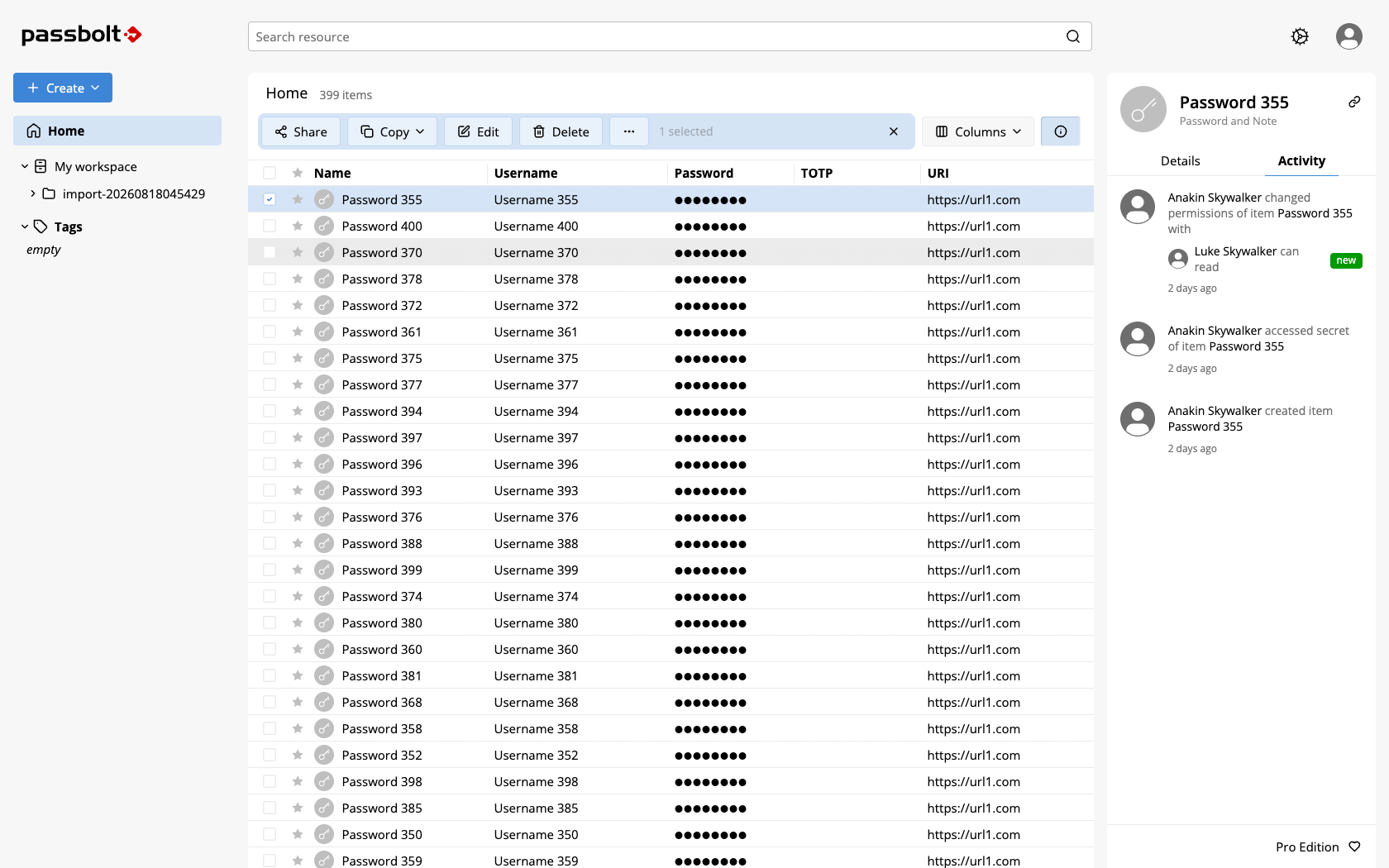
The tab of a resource renders five kinds of entries:
| Entry | Meaning |
|---|---|
| "created item" | The resource was created |
| "updated item" | The resource metadata was updated |
| "accessed secret of item" | Someone decrypted and read the secret |
| "updated secret of item" | The secret itself was changed |
| "changed permissions of item" | The resource was shared, or a permission was changed or removed |
Each entry shows the author's avatar and name, the sentence above, and a relative date whose tooltip carries the exact timestamp. Permission changes expand into a list of the users and groups involved, each with its permission level, "can read", "can update" or "is owner", and a change label, "new", "updated" or "deleted". Other entries do not detail what changed.
The tab loads a first page of entries and offers a More button to load older ones. An entry the interface does not know how to render appears as "Unknown activity, please contact your administrator."
Folder entries cover folder creation, folder updates and permission changes.
The tab requires the Pro Edition or Cloud, and it is also governed by the role of the user in role-based access control. A user whose role does not allow seeing activities gets the sidebar without the tab. Mind that RBAC restricts the interface, not the API: hiding the tab does not prevent an authorised call to the endpoints below.
Deletions are a blind spot of the tab: a deleted resource no longer has a sidebar, so its final entry is only reachable through the API.
Query the audit log through the API
Four read-only endpoints expose the trail. They are not described in the API reference: use the table below.
| Endpoint | Returns | Who can call it |
|---|---|---|
GET /actionlog/resource/{resourceId}.json | The activities of one resource | Users with access to that resource |
GET /actionlog/folder/{folderId}.json | The activities of one folder, when the folders plugin is enabled | Users with access to that folder |
GET /actionlog/user/{userId}.json | The activities about one user account | Filtered by the rights of the caller |
GET /actionlog/logs.json | The whole action log | Administrators only |
The three per-entity views return paginated results and answer 404 when the entity does not exist or the caller has no access to it, so a missing entity and a forbidden one are indistinguishable.
GET /actionlog/logs.json accepts a fixed set of filters: has-users, is-success, created-after and created-before, plus a contain on user and user.profile, and sorting on created. It is the endpoint to use for a periodic extraction, for example:
curl -s -H "Authorization: Bearer $JWT" \
  "https://passbolt.example.org/actionlog/logs.json?filter[created-after]=1767225600&filter[is-success]=1"
The user trail has no equivalent in the interface: there is no Activity tab on a user, so GET /actionlog/user/{userId}.json is the only way to read it.
Retention
Action logs accumulate for as long as you keep them. Two operations matter:
- Purge old rows with the
action_logs_purgecommand, which takes a retention in days and supports a dry run. Purged rows are gone from the interface and the API as well. - Forward the rows to a SIEM if you need to retain them longer than in passbolt, or to correlate them with the rest of your estate. Forwarding is not a backfill: it only emits rows created after you enable it.