How to configure passbolt to use TOTP
Passbolt Pro Edition since v2.4 and CE since v3.9 support TOTP (Time-based One Time Password) as a multi factor authentication option.
TOTP is a type of authentication method that generates a new, unique password at set intervals (such as every 30 seconds) to be used in addition to another authentication method (such as username and password).
Multi Factor Authentication requires HTTPS to work.
Security considerations
When using Time-based One-Time Passwords (TOTP) as a form of multi-factor authentication, it is recommended to set up at least one additional multi-factor authentication method as a backup. Should the Time-based One-Time Passwords (TOTP) service experience downtime, this measure guarantees that users can continue to access their accounts despite the malfunction of one authentication method.
Another consideration involves ensuring accurate time synchronization between the server and client devices. Without this, TOTP codes may not align, leading to authentication failures.
Enable TOTP access
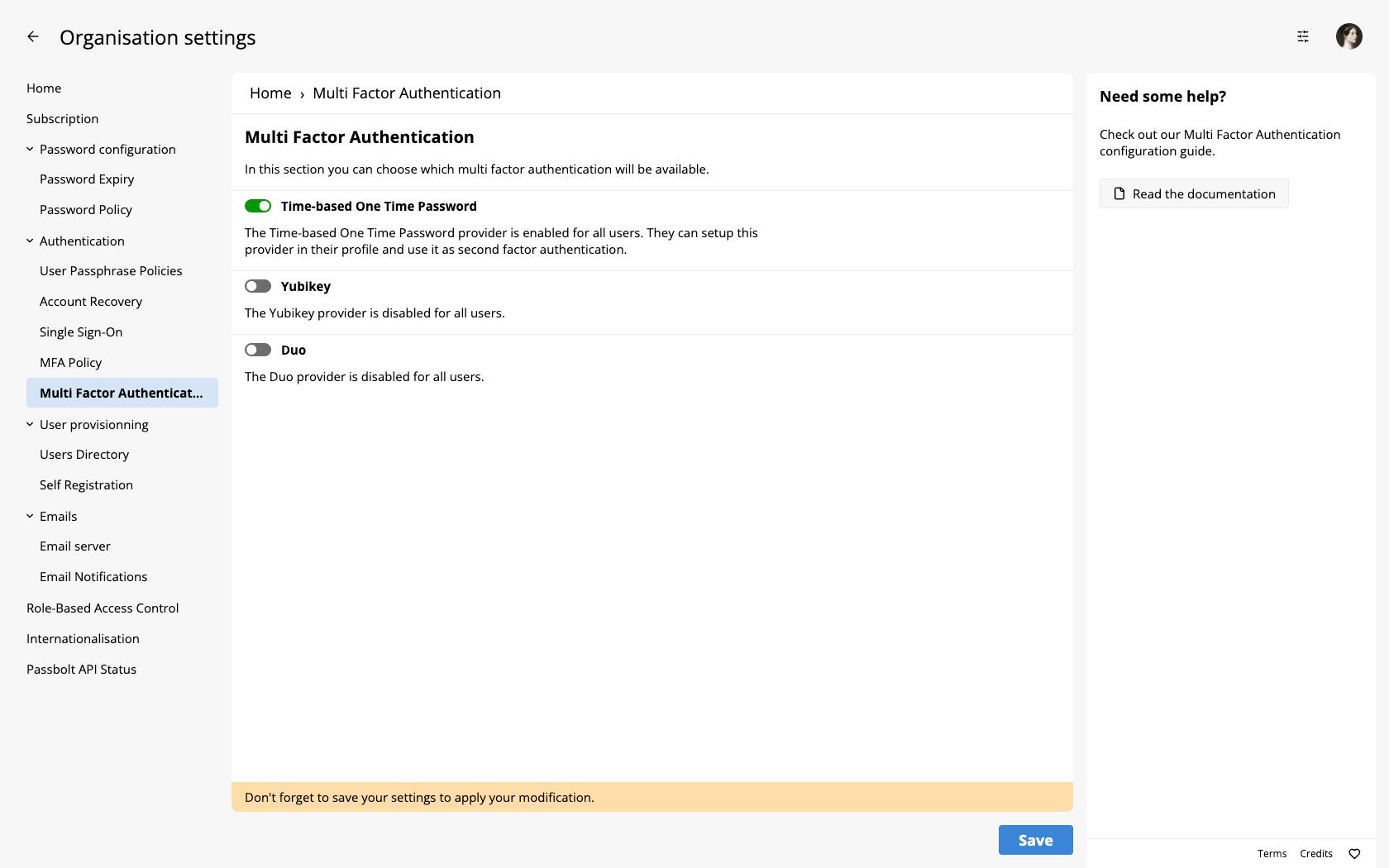
To enable TOTP for the organization, navigate to the multi-factor authentication administration page: Administration > Multi Factor Authentication. Subsequently, enable the "Time-based One Time Password" provider by moving the adjacent toggle to the on position. Ensure you save these modifications to activate the provider.
Setup TOTP as a user
To setup TOTP as multi-factor authentication method, please refer to our dedicated user guide.