How can I disable MFA for a specific user?
When a user who configured multi-factor authentication loses access to their second factor, an administrator can disable it for them, either from the interface or from the server.
Interface
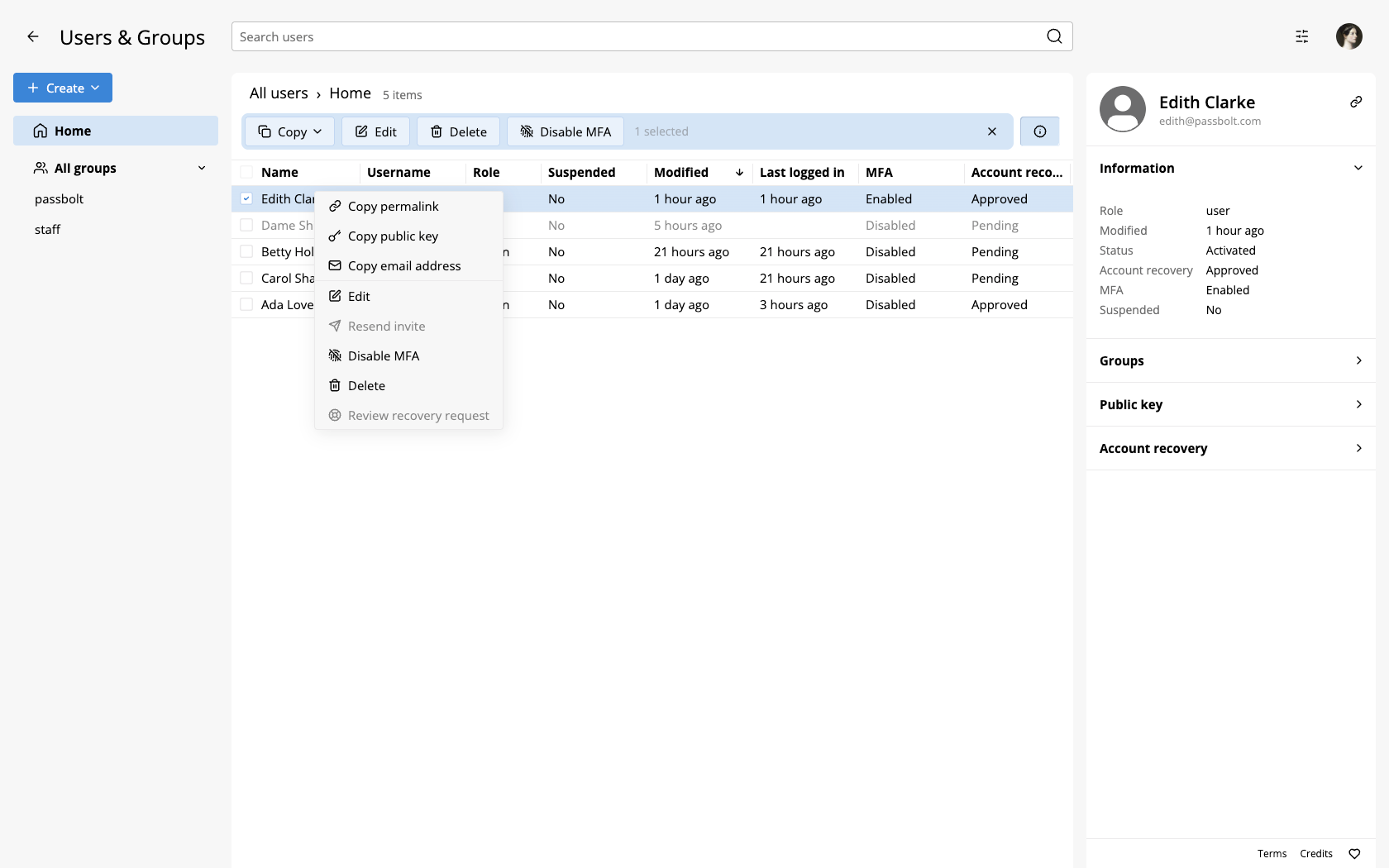
In the users workspace, as an administrator, it is possible to right click on the user and Disable MFA.
Server
When the interface is not an option, for example when the only administrator is locked out by their own second factor, run the dedicated command on the server. Replace USERNAME with the email address of the user:
sudo su -s /bin/bash -c "/usr/share/php/passbolt/bin/cake passbolt mfa_user_settings_disable -u USERNAME" www-data
On success the command prints The MFA for user "USERNAME" has been disabled.
This does more than clearing the setting: it also invalidates the verified MFA tokens of that user, so a device that was remembered for a month stops being trusted, and it triggers the notification email. The user configures their second factor again afterwards, and if your MFA policy is set to Prompt, they are invited to do so at their next sign-in.
This command is available since passbolt 5.7.0. It requires shell access to the server, so it applies to self-hosted instances: on a Cloud plan, contact passbolt support, where disabling multi-factor authentication for a locked-out administrator goes through an identity verification.
See the cake commands reference for the invocation on Docker and from-source installations.