How to View the Secret History of a Resource
Since version 5.7.0, passbolt can keep the previous versions of a secret instead of discarding them when someone updates it. If a colleague changes a password and the old one is still needed somewhere, you can read it again.
Secret history is in beta.
You can view a past value, but you cannot restore it in one click. To go back to an earlier value, read it in the history, then set it again as a normal update of the secret. That update becomes a new revision of its own, it does not rewrite the history.
Open the secret history
- In the passwords workspace, right click the resource, or select it and use the more button.
- Select Secret history.
- Enter your passphrase, as you would to display a secret.
The entry is absent, rather than empty, when secret history is not available to you. Either your administrator has not enabled and configured it for the organisation, or your role is not allowed to preview secrets. Disabling secret preview also removes access to the history, since the history shows secrets.
What the dialog shows
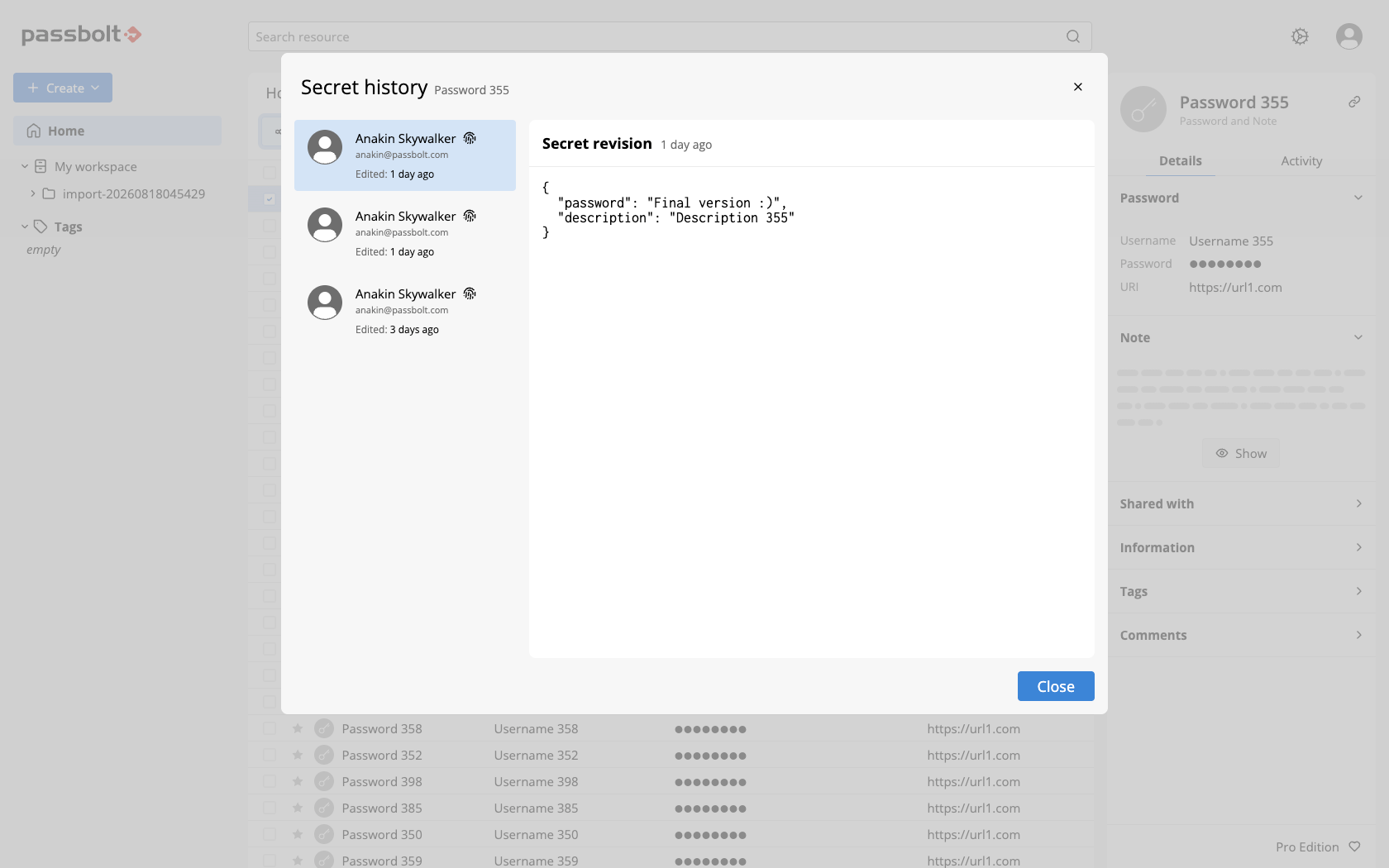
The dialog is titled Secret history, with the name of the resource below it, and it is split in two.
On the left, the revisions, most recent first. Each one names the person who made the change, with their avatar, their email address and a fingerprint icon whose tooltip gives the fingerprint of their OpenPGP key. The date is relative, such as "3 days ago". A revision made by someone who has since been suspended or deleted from the organisation is labelled accordingly, and an author who can no longer be identified appears as "Unknown user".
On the right, the revision you selected in the list. Its value is displayed in clear, as structured text, field by field, so a revision of a password resource shows the password, the note, the one-time password or the custom fields it held at the time.
Nothing is masked in this dialog, and there is no button to reveal a field. Opening the history puts former secrets on your screen straight away, so treat it like displaying a secret: mind who can see the screen, and close the dialog when you are done.
Selecting a revision on the left displays it on the right. There is no action on a revision, and the only button of the dialog is Close: no copy, no export, no restore.
When a resource has no revision yet, the dialog opens on "There is no revision". An instance upgraded to version 5.7.0 shows that state less often than you might expect: the upgrade created a baseline revision for the secrets that already existed, so their history is not empty from the start.
Revisions you cannot open
A revision created before the resource was shared with you stays visible in the list, greyed out and impossible to select. Its tooltip explains why: "You cannot access revisions created before the resource was shared with you." The revision itself is returned, with its date and its author, but the encrypted secret behind it only exists for the people who had access at the time, so there is nothing for you to decrypt.
The reverse also holds. If you lose access to a resource, your copies of its past revisions are deleted along with your access to the current secret.
What is kept, and for how long
Only the encrypted secret is versioned, which means the password, the one-time password and the note. The name, the username, the URIs and the description of the resource are metadata and are not part of the history. Only resources in the version 5 format have a secret history.
How many past revisions are kept is an organisation setting, described in the secret history administration page. Once the limit is reached, the oldest revision makes room for the newest.
Opening a revision is recorded
Viewing a past revision counts as an access to the secret, exactly like previewing the current secret. It appears in the activity of the resource, where the other people who share it can see it.
Reading the history is therefore not a discreet operation, which is the point: it is the same trace that lets you find out who changed a password and when.