What is the Keys inspector?
Your passbolt account is built on an OpenPGP key pair. The Keys inspector is where you read the details of that key, and where you download it. You need it in three situations: when someone asks you for your fingerprint, when you want to know whether your key is about to expire, and when you need a copy of the key itself.
Open the Keys inspector
- While logged into your passbolt account, click your account image in the top right corner.
- Select Manage account.
- Open the Keys inspector tab.
What the fields mean
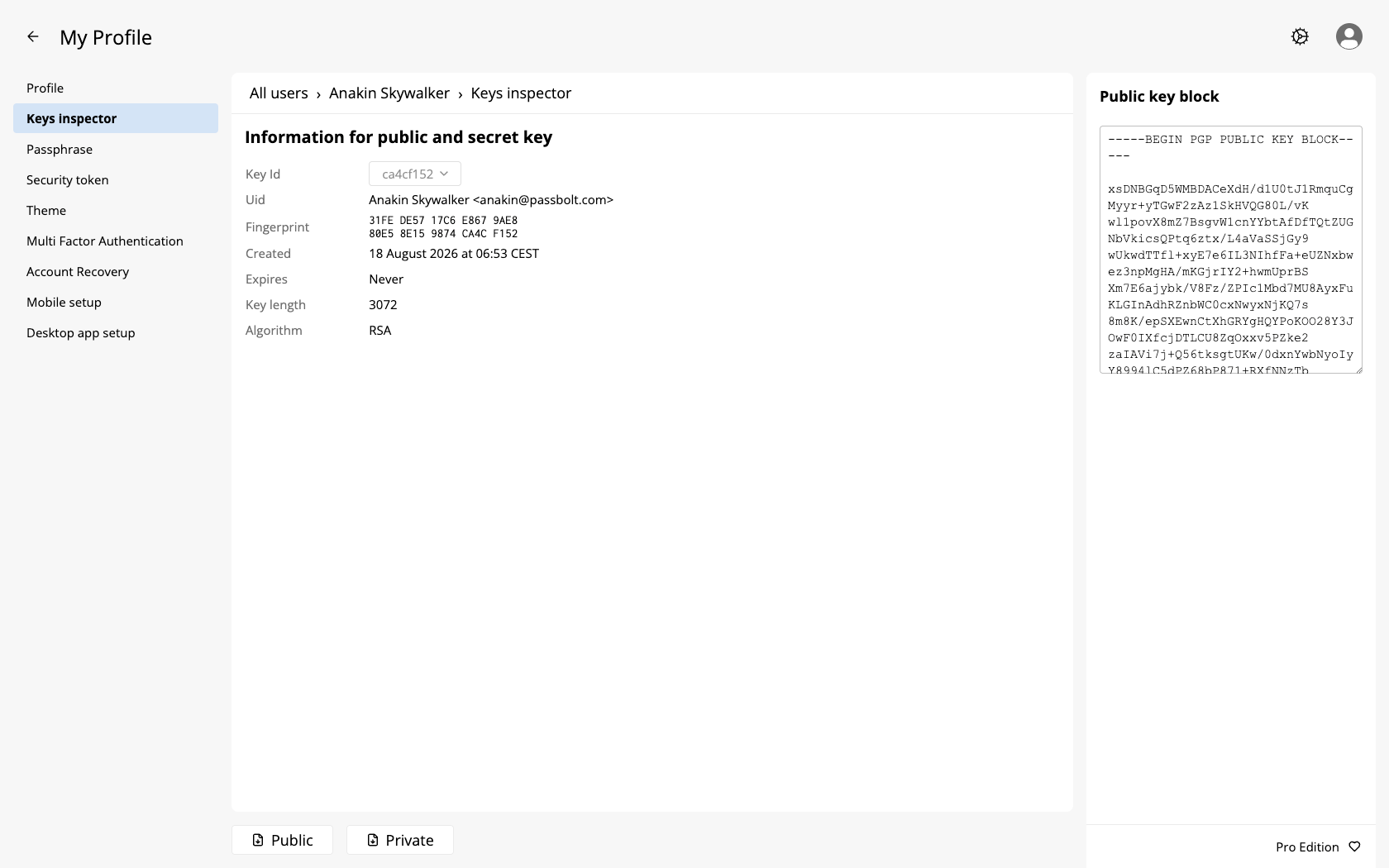
Under the heading "Information for public and secret key", eight fields describe your key:
| Field | What it is |
|---|---|
| Key Id | The short identifier of the key. |
| Uid | The name and email address the key was created for. |
| Fingerprint | The full identifier of the key, and the one to use when somebody asks you to confirm it. |
| Created | When the key was generated. |
| Expires | When the key stops being valid, if ever. |
| Key length | The size of the key, in bits. |
| Algorithm | The cryptographic algorithm of the key, such as RSA or an elliptic curve one. |
| Curve | The name of the curve, for a key based on one. |
The field is rendered as a dropdown with a single entry, and it is deliberately inert. Its tooltip says it plainly: you can only have one key on your account at the moment.
Reading the expiry date
Compare the Expires date with today's date yourself. This screen shows no badge, no colour and no warning, so an expired key looks exactly like a valid one, only with a date in the past.
Two values are not dates at all:
- Infinity means the key has no expiry date, which is the usual case for a key generated by passbolt.
- An empty field means passbolt could not determine the expiry, which is a sign of a key it cannot read properly. If you see this, contact your administrator rather than trying to fix it yourself.
Key length and curve
For an RSA key, Key length is the size you would expect, such as 3072. For a key based on an elliptic curve, the field shows an equivalent size in bits, 256 for a Curve25519 or Ed25519 key for instance, and the curve itself appears in the Curve field. Some curves leave the length empty, so rely on Algorithm and Curve to know what your key is.
The two numbers belong to different scales and cannot be compared. An elliptic curve key of 256 bits is at least as strong as an RSA key of 3072 bits, and it is faster. A shorter number here is not a downgrade.
Download your keys
Two buttons sit at the bottom of the screen:
- Public saves your public key as
passbolt_public.asc, and asks for nothing. This is the file to hand over when a correspondent wants to encrypt something for you outside passbolt. - Private saves your private key as
passbolt_private.asc, and always asks for your passphrase first, even when you have just signed in and passbolt has remembered it.
Both files are plain text, in the armoured OpenPGP format.
passbolt_private.asc is the same file as your account recovery kit: protected by your passphrase, and enough to take over your account for anyone who also learns that passphrase. Store it accordingly, as explained in downloading the account recovery kit.
Fingerprints other than your own
This tab only ever shows your own key. To check another fingerprint:
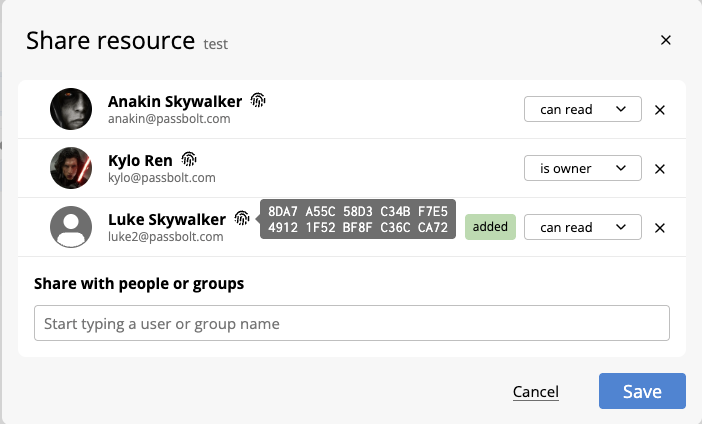
- For a colleague, hover the fingerprint icon that sits next to their name, for example in the suggestions of the share dialog:
- For the shared metadata key, an administrator can read it in the metadata key settings.
- The fingerprint of the server key is not shown here. Your browser extension verifies it at every sign in, and warns you when it changes.