How to View the Activity of a Resource
The Activity tab shows what happened to a resource: who created it, who changed it, who read its secret and who it was shared with. It is available in the Pro Edition and Cloud plans.
Steps
- Select a resource in the passwords workspace.
- Open the details sidebar on the right.
- Select the Activity tab.
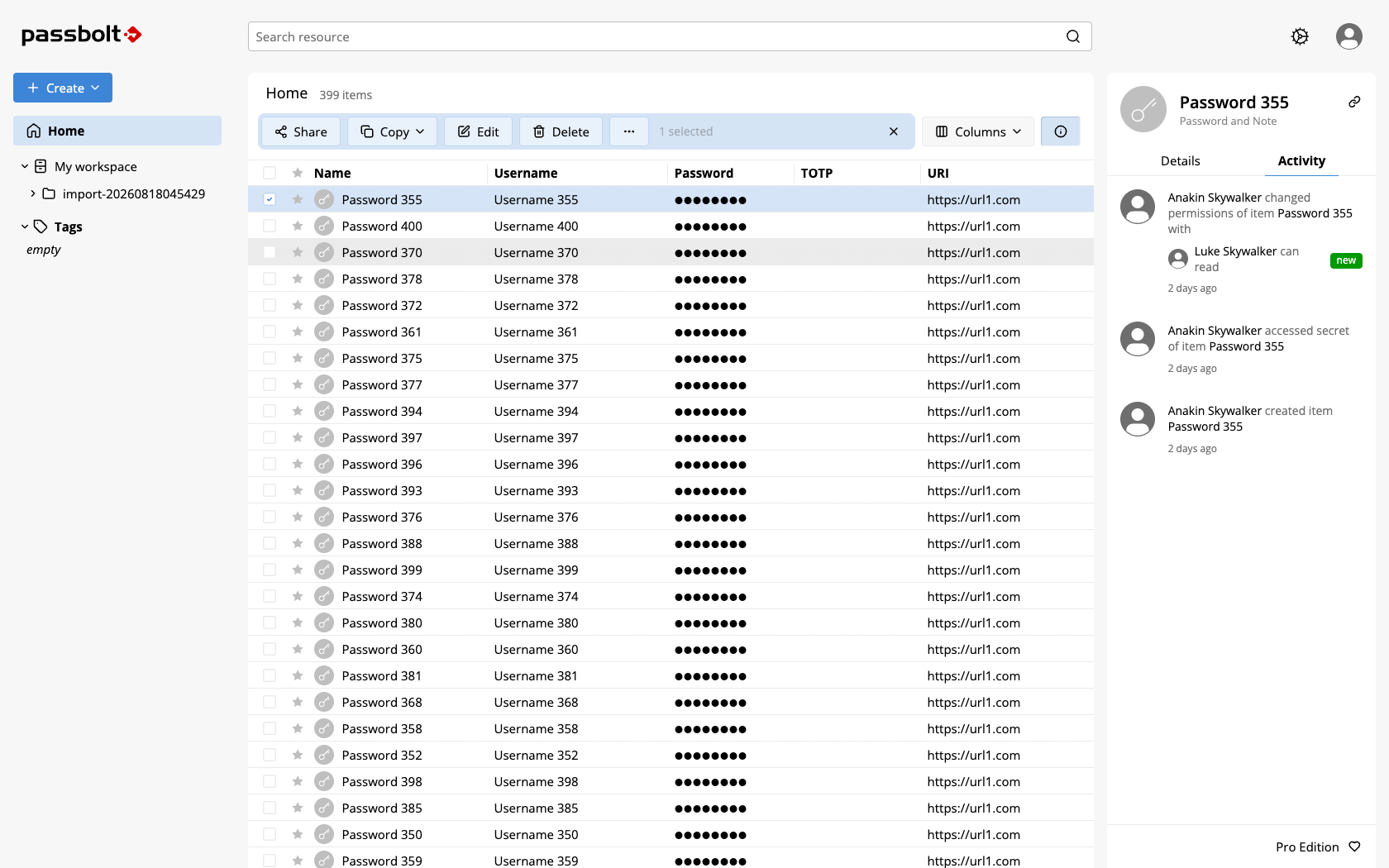
Folders have the same tab, listing folder creations, folder updates and permission changes.
What the activity shows
Five kinds of entries appear for a resource:
- created item: the resource was created.
- updated item: its metadata was updated, for example the name or the username.
- accessed secret of item: someone read the secret.
- updated secret of item: the secret itself was changed.
- changed permissions of item: the resource was shared, or a permission was changed or removed.
Every entry shows who performed the action and when, with the exact date and time in the tooltip of the relative date. Permission changes list the users and groups involved with their permission level, "can read", "can update" or "is owner", and whether the permission is new, updated or deleted. The other entries tell you that a change happened, not which fields changed.
Only a first page of entries is loaded: use the More button to go further back in time.
Beyond the edition, the tab depends on your role: an administrator can restrict who is allowed to see activities. If you expect the tab and it is missing, ask your administrator.
Administrators can also read this trail through the API, including the activity of user accounts, which has no tab in the interface. See the audit log.