Improving passbolt security with distroless containers
4 min. read
Diego Lendoiro
17 August, 2020
It’s undeniable that containers have had a big impact on today’s software engineering.
From infrastructure to deployments and development, containers introduced many benefits and challenges along the way. Some of the challenges we found at passbolt revolve around how to harden the containers and how to make them smaller.
Nowadays docker images look more like small virtual machines rather than just an encapsulated process running in a container. This is usually convenient for the vast majority of vendors. However, reducing the size of passbolt container images would:
Reduce the disk usage.
Improve build times on CI.
Minimize network usage when pulling and pushing images.
Decrease the attack surface (by reducing the number of services).
Simplify the patching process (by reducing the number of dependencies).
Enhance signal to noise ratio when running vulnerability scanners (as false positives will be less likely).
Help establish the provenance of what it is installed in your container to just what you need.
Most GNU/linux distributions publish the so called ‘-slim’ images which is already a good approach to reduce the dependencies your image ships. The alpine container images go in this same direction. However, alpine didn’t work well for us in the past so we were looking for something else to run a very small production workload.
Enter minimal “distroless” images
The distroless project initially started by Google provides a way to build docker images using a software building tool called bazel.
{Fast, Correct} — Choose two
As per the distroless project’s readme:
”Distroless” images contain only your application and its runtime dependencies. They do not contain package managers, shells or any other programs you would expect to find in a standard Linux distribution.
The framework that the distroless project proposes had some benefits for us:
It is based on debian packages.
We can continue using the nginx / php-fpm stack which is known for us.
As it is based on debian packages we still rely on a solid project that will continue the patching of dependencies passbolt requires.
We can take advantage of our recently published debian package.
As it forces you to pin debian snapshots, builds are deterministic.
It had some drawbacks:
We had to build what they call “lang image” as there was no php-fpm distroless image. A pull request is pending approval.
We introduce a new tool to learn / dependency with bazel.
The concept of the distroless images is that deb files are nothing more than a compressed file that contains some files and a directory structure.
Think about an empty file system where you untar your debs. We are setting a container that is just one process running so we just need to untar in such container as many dependencies to make this process to run without errors. As long as your process finds all the libraries on the expected locations you are good to go.
So first we needed to create a base php-fpm distroless image or what they call it a “lang image”. In our case the php-fpm image contained the minimum and what we thought were popular extensions:
php-cli or php-fpm binary as entrypoint
Php extensions: php-json, php-mysql, php-common (package that contains a bunch of common extensions) and some more. The list is here
Configuration files: — A /etc/passwd file with an entry for www-data — A www.conf pool to set up some parameters of the php-fpm process
That’s it! Do not expect to find anything else such as bash or any other shell or common linux utilities.
Then we used this php-fpm image to build our passbolt-fpm images on top of it. During the process we though that with just a distroless FPM version of passbolt would be enough. However, we realized soon enough that users would need some extra container images for admin tasks such as running migrations, create users and other command line utilities.
Both passbolt-fpm and passbolt-cli container images are very similar with a few different packages:
Gnupg
Extra php-extensions: php-gnupg, php-intl, php-redis
Bash (only for passbolt-cli image)
Image sizes
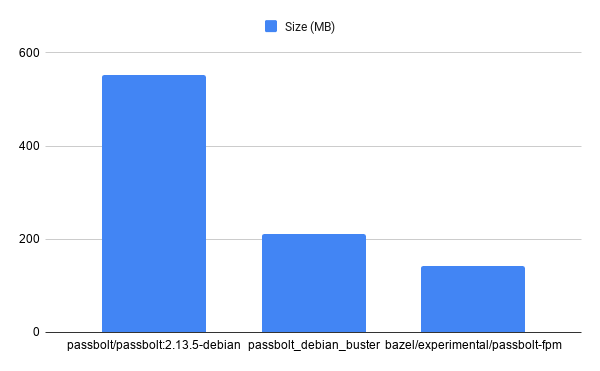
Comparing the sizes the reduction is quite big:
On the above chart we have used:
passbolt/passbolt current docker image based on php:7.3.21-fpm image
passbolt_debian_buster local image created based on debian:buster-slim image
bazel/experimental/passbolt-fpm distroless image
Vulnerability scan
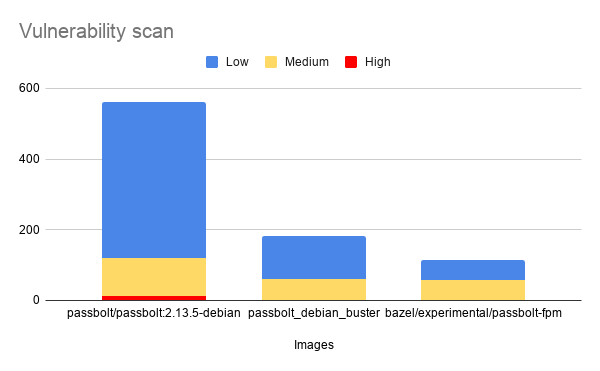
For the tests we used aquasec’s trivy and we obtained the following results:
Vulnerability scanning is usually a very noisy step, assessing if a library that is bundled in your container is producing a risk or not is time consuming. Reducing the number of positives helps teams to assess easier if an image can be promoted to production environments.
Hands on test
If all the above sounds nice to you we have published the code to build all the distroless images:
And we also branched off our official passbolt-docker repo with a docker-compose.yml you can use to launch the whole stack of distroless passbolt images:
This way you will be able to launch the whole passbolt stack using docker-compose. Keep in mind there are some caveats described on the readme.
Future work
We are aware there are other solutions to make php images smaller and we hope to publish more articles on the topic in the future.
Our plan is to continue pushing this approach on our hosted solutions and keep it always open for the community to build better tailored solutions and use them on premises if they think it fits their use cases.