
4 min. read
What’s cooking for 2022 ?
It’s the end of the year and even though a lot happened in the past 12 months there is more in preparation. We thought that it would be…


Passbolt is not just “another password manager”. It is built for teams and, thanks to its API, can be used as part of your automated workflows. Today we will have a closer look at a real-life devops use case that is supported by passbolt: continuous integration, continuous delivery, and continuous deployment, or CI/CD for short.
Our goal is to integrate passbolt with Gitlab using go-passbolt-cli (a community-led command line tool for passbolt). We’ll use these tools to build, test and push a given docker image to the Docker Hub.
Disclaimer: The content of this article is based on my personal experience only and may not meet the needs of your organization. You should consider this article as a demo of passbolt capabilities rather than an “official passbolt guide”. Consequently, this is in no case a recommendation for use in a production environment. Use it with caution.
Both developers and operation teams need to manage multiple types of credentials in a secure way. They need a password manager not just to store their regular passwords but also to manage server-side secrets and integrate them as part of the infrastructure. Passbolt reconciles both these use cases in one single tool, where different teams collaborate and break artificial data silos as they see fit.

Using passbolt for managing CI/CD secrets introduces some benefits: Developers will be able to maintain the list of secrets an application needs. System administrators will be able to re-use these resource lists to set up staging and production environments. Administrators will be able to rotate secrets directly within passbolt without having to update the job definition in the tools that use them. Moreover they will be able to control, restrict and revoke access to such CI/CD jobs.
We will see below how to configure Gitlab jobs to retrieve secrets from passbolt.
First things first, we need to set up a dedicated space in passbolt to store the credentials that will be accessed via gitlab runners. In our opinion a good practice would be to create a dedicated passbolt user per project and share only the needed passwords in read-only mode, instead of one having access to all CI passwords. This will avoid the leak of all of your passwords in the terrible case where your gitlab pipelines would be compromised.
You can create this new user through the web UI but since you love command lines, you probably want to automate the user creation ;) To do that, you can adapt the following script to your needs to be executed on your passbolt:
server:#!/usr/bin/env bash

set -euo pipefail

TMPGNUPGHOME=$(mktemp -d)
EMAIL="[email protected]"
PASSPHRASE="strong-passphrase"
FIRSTNAME="John"
LASTNAME="Doe"
KEYSIZE=2048
PASSBOLT_FQDN="passbolt.domain.tld"

# Register a new user and get its uuid + token registration
REGISTRATION_URL=$(sudo -H -u www-data bash -c "/usr/share/php/passbolt/bin/cake passbolt register_user -u ${EMAIL} -f ${FIRSTNAME} -l ${LASTNAME} -r user" | grep http)

USER_UUID=$(echo "${REGISTRATION_URL}" | cut -d/ -f6)
USER_TOKEN=$(echo "${REGISTRATION_URL}" | cut -d/ -f7)

# Generate OpenPGP keys
gpg --homedir ${TMPGNUPGHOME} --batch --no-tty --gen-key <<EOF
  Key-Type: default
  Key-Length: ${KEYSIZE}
  Subkey-Type: default
  Subkey-Length: 2048
  Name-Real: ${FIRSTNAME} ${LASTNAME}
  Name-Email: ${EMAIL}
  Expire-Date: 0
  Passphrase: ${PASSPHRASE}
  %commit
EOF

gpg --passphrase ${PASSPHRASE} --batch --pinentry-mode=loopback --armor --homedir ${TMPGNUPGHOME} --export-secret-keys ${EMAIL} > secret.asc
gpg --homedir ${TMPGNUPGHOME} --armor --export ${EMAIL} > public.asc

rm -rf ${TMPGNUPGHOME}

# Make an API call to register user
curl "https://${PASSBOLT_FQDN}/setup/complete/${USER_UUID}" \
  -H "authority: ${PASSBOLT_FQDN}" \
  -H "accept: application/json" \
  -H "content-type: application/json" \
  --data-raw "{\"authenticationtoken\":{\"token\":\"${USER_TOKEN}\"},\"gpgkey\":{\"armored_key\":\"$(sed -z 's/\n/\\n/g' public.asc)\"}}" \
  --compressed
The script will generate an OpenPGP key pair: secret.asc and public.asc. Keep it handy, we will need it later.
There are multiple CLI available for passbolt, but go-passbolt-cli is currently the most advanced CLI to interact with passbolt API. It is a community project that was included in the last passbolt security audit carried out by Cure53. It is hosted on Github and you will find in the README of the project clear instructions about how to install and configure it. Each available command is described in their wiki.
Once go-passbolt-cli installed and configured, you can create a new passbolt resource:
passbolt create resource \
 - name "docker.com token for gitlab" \
 - username "[email protected]" \
 - password "Ch4ng3-m3-pl35E" \
- uri "https://docker.io"The next step would be to set up a project in gitlab. We created a sample gitlab repository for our use-case and defined 3 simple steps for our pipeline:
Steps 1 and 2 are well known for our devops mates, that’s why we will focus on the third step, where we will retrieve Docker Hub credentials, stored in our passbolt instance.
In this job we will use a go-passbolt-cli docker image to retrieve our secret and authenticate to Docker Hub. The pipeline jobs definition is located in the .gitlab.yml file at the root of the project. Here is a the interesting section of the job definition that does this:
# Set the configuration file containing the private OpenPGP key and passphrase
cat ${PASSBOLT_CLI_CONFIG} | base64 -d > /root/.config/go-passbolt-cli/go-passbolt-cli.toml

# Login to gitlab CI registry
# CI_REGISTRY_* variables are dynamically set by gitlab
docker login -u ${CI_REGISTRY_USER} -p ${CI_REGISTRY_PASSWORD} ${CI_REGISTRY}

###
# login to Docker HUB registry / fetch password from passbolt
###

# Define resource name and username as they are named in passbolt
NAME="docker.com token for gitlab"
USERNAME="[email protected]"

# Get passbolt resource ID from passbolt resource name and username
ID="$(passbolt list resource - column ID - column Name - column Username \
| grep "${NAME}" | grep "${USERNAME}" | head -n1 | awk '{print $1}')"

# Get passbolt resource password from its ID
PASSWORD=$(passbolt get resource - id ${ID} | grep Password | sed 's/^Password: //g')

# Authenticate to Docker Hub with password retrieved from passbolt
docker login -u ${USERNAME} -p ${PASSWORD} docker.io

# Pull image from Gitlab registry
IMAGE="$(echo ${CI_REGISTRY}/${CI_PROJECT_PATH}/nginx-distroless-unprivileged:${NGINX_VERSION} | tr '[:upper:]' '[:lower:]')"
docker pull ${IMAGE}

# Tag image with docker hub tag
docker tag ${IMAGE} anatomicjc/nginx-distroless-unprivileged:${NGINX_VERSION}

# Push it
docker push anatomicjc/nginx-distroless-unprivileged:${NGINX_VERSION}
Environment variables used in the job such as CI_REGISTRY_USER, CI_REGISTRY_PASSWORD, CI_REGISTRY, are dynamically set and only available if the Container Registry is enabled for the project. They are valid only as long as the job is running, as explained in Gitlab predefined variables reference.
In the script above, we use grep / awk / head dark magic to retrieve the ID and password of our passbolt resource. There is no json output for now, so we cannot parse output with jq. But there is an issue open on github for this.
Go-passbolt-cli needs the user private OpenPGP key and its passphrase as part of its configuration file and reducing visibility of the OpenPGP key and passphrase will mitigate this main security risk.
In the example script above, we use $PASSBOLT_CLI_CONFIG, a Gitlab CI variable to store our go-passbolt-cli configuration file.
Gitlab CI variables are cool, but we’re trying to move away from storing secrets in clear there. Indeed by using CI variables we’re almost back to square one, with only the additional ability to shut off the attacker by deleting the user in passbolt. Functionally also we can now rotate secrets directly in passbolt, which is nice.
So let’s see if we can push the security a step further. More specifically an attacker having access to the gitlab repository configuration should not be able to steal our secrets.
So, how can we improve the security of the private OpenPGP key and make it not visible in gitlab? It can be achieved in multiple ways by using Mozilla SOPS, KMS, or HSM. In this article, we will install our own self-hosted gitlab-runner on a server we trust. The configuration file will be mounted directly in the runner jobs.
On our server, we install docker and gitlab-runner, and register the runner for our
gitlab project:gitlab-runner register — url https://gitlab.com/ — registration-token xxxxxEdit the volume definition in your /etc/gitlab-runner/config.toml to include go-passbolt-cli configuration file:
(…)
volumes = [“/cache”, “/root/go-passbolt-cli.toml:/root/.config/go-passbolt-cli/go-passbolt-cli.toml”]
(…)
As we are running gitlab-runner with docker, you need some privileges to build docker images.
In /etc/gitlab-runner/config.toml, you can set under [runners.docker] section privileged parameter to true (default is false), or add a security_opt like the one below:
(…)
[runners.docker]
security_opt = [“seccomp:unconfined”, “apparmor:unconfined”]
(…)
Go to Settings > CI/CD > Runners > edit your runner, give a tag to your runner, and add this tag in your .gitlab-ci.yml job. With this, you will ensure your job will be picked only by your self-hosted runner:
tags:
  - self-hosted-runner
And after a restart of the gitlab-runner service, our runner will pick up jobs from our project, and automatically mount go-passbolt-cli configuration file in all jobs.
You can now remove this line from your job definition as well as the PASSBOLT_CLI_CONFIG Gitlab CI variable.
# Set the configuration file containing the private OpenPGP key and passphrase
cat ${PASSBOLT_CLI_CONFIG} | base64 -d > /root/.config/go-passbolt-cli/go-passbolt-cli.toml
Our private OpenPGP key is no longer stored in Gitlab CI variables. It is great but not yet perfect as anyone who is able to launch a pipeline will be able to read our key.
There is still one issue to solve. Indeed with the default rights, anyone having access to the repository would be able to modify the gitlab jobs and modify the script run on the runner to extract some valuable data such as the private key. In order to protect your pipeline and avoid it to be launched or modified by an unwanted person, we need to do some additional hardening on the configuration.
Ensure your job will be triggered only on main branch:
rules:
  - if: $CI_COMMIT_REF_NAME == "main"
Protect the main branch by set the “Allowed to push” to “No one” and enable the Code Owner approval feature.

Create a CODEOWNERS file and protect sensitive files for modification by others.
.gitlab-ci.yml @AnatomicJC
CODEOWNERS @AnatomicJC
If someone wants to edit protected files, he will have to perform a merge request and users defined in CODEOWNERS file will have to manually approve the change. No approval, no pipeline modification!
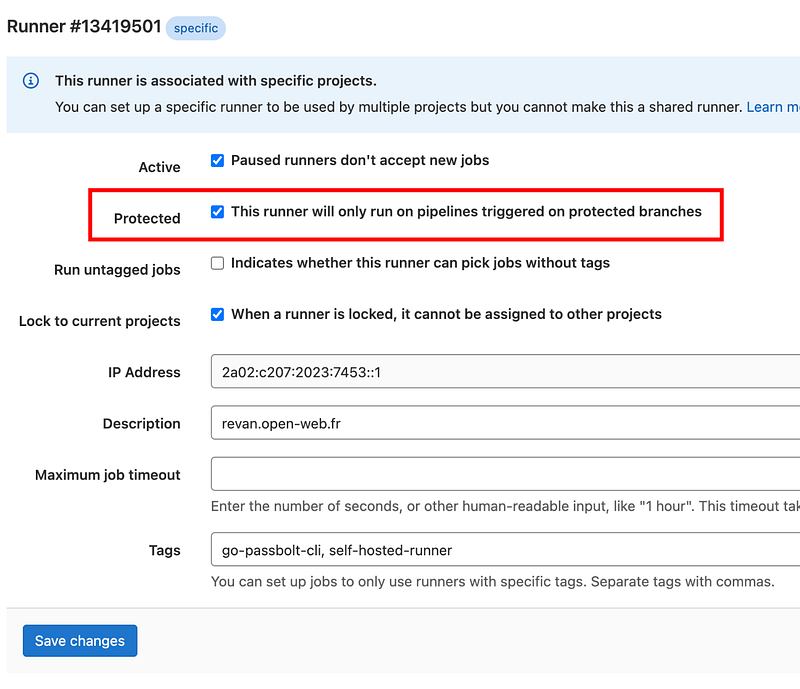
Ensure our self-hosted gitlab-runner gets jobs only from protected branches and ignore other ones. In this way, malicious pipelines will never be run on gitlab-runner with our private key.
You can protect your runner in the settings of your gitlab repository, in Settings > CI/CD > Runners > edit your runner
You can use a rootless image, and configure sudo to make sure your user will be allowed to run passbolt CLI without the availability to read its configuration file. You will find an example here.
Do not use docker with its default configuration and run the daemon as non-root user. Docker can be replaced with kaniko or, like us in our demo repository, buildah to build docker images in user space..
That’s all for today! We talked about how to use passbolt with Gitlab CI/CD without sharing the private OpenPGP key. We explored how to do it with a self-hosted gitlab-runner.
We also discovered go-passbolt-cli and some tips to automate user creation in passbolt.
While this approach may not be suitable depending on your use-case or environment, we hope this gives you some ideas on how you can leverage passbolt to automate some of your workflows.
Feel free to open a discussion on passbolt community forum to discuss your ideas, your requirements for CI/CD. We’ll be happy to see what you are building too!
4 min. read
It’s the end of the year and even though a lot happened in the past 12 months there is more in preparation. We thought that it would be…
4 min. read
A summary of the recent achievements on the security and compliance front: SOC2 Type II, independent audits, Security Made in Europe label


 Made in Europe. Privacy by default.